Anatomy and Physiology 12 – CRISPR-Cas9 analysis

OVERVIEW
In Anatomy and Physiology 12, we have been examining DNA and the process of protein synthesis, with a lesson and emphasis on CRISPR-Cas9. CRISPR-Cas9 is a gene editing technology which lets scientists alter DNA accurately by adding, deleting, or substituting genes. This innovative technology is employed in multiple ways, such as: to fix mutations, investigate genetic functions, and enhance health.
WHAT IS CRISPR-CAS9?
CRISPR stands for Clustered Regularly Interspaced Short Palindromic Repeats, while Cas9 is an enzyme that performs as “scissors”, cutting DNA. Together, CRISPR-Cas9 is a gene-editing system that can target and change specific parts of certain genes, for better performance.
ACTIVITIES AND PROCESSES
To understand how this technology works, we performed different activities that further developed on the concept of CRISPR. These activities were: the paper cut out model activity, and multiple online activities. Both of these ways of learning helped to visualize and understand each step of the CRISPR process, from how the enzyme finds a target sequence to how DNA can be cut and repaired. By participating in these not only hands-on but also digital visuals, we developed a clearer understanding of how scientists can “knock out” or “knock in” genes using CRISPR.

Once the CRISPR-Cas9 system is inside of the cell, the guide RNA finds the DNA for a matching sequence. When it finds the right spot, Cas9 searches for a PAM sequence – a short pattern like “GGG,” – and attaches itself there. This is a necessary step, since it ensures the cut/change happens at the correct location to reduce harmful consequences.

After Cas9 has bonded to the DNA at the PAM site, it cuts both sides of the DNA – this cut lets scientists change the DNA in that precise spot.

When DNA is cut, cells will immediately try to repair that change/damage. One method of reparation, is called Non-Homologous End Joining (NHEJ), in which, the cell binds the broken DNA ends together again. However, the cell can also accidentally add random DNA sequences. Because of that, this repair can make small mistakes, turning off a gene.

Another method scientists may use is homology-directed repair (HDR). This process is undergone by giving the cell a piece of “donor DNA” as a template, which they can then guide to repair the DNA accurately or insert new information.


BENEFITS AND LIMITATIONS OF MODELS

In the CRISPR modeling activity we did, we used paper cut out models and an online imitation of the process, to see and understand how the process works. These models:

– Allows us to observe the main steps of CRISPR-Cas9, such as the attachment, cutting and repairing of DNA.

– Made it simpler to imagine what happens inside a cell, by giving us first-hand views.

Of course, however, there were limitations to these activities.

– These models did not have life sized explanations, and they didn’t show how CRISPR-Cas9 moves, nor how it wraps around DNA.

– There was also a difficulty in seeing how random DNA pieces were added during repair.

SUGGESTIONS

To make the paper cut out activity better, the models could show the actual size of CRISPR-Cas9,, and clearly show how CRISPR works inside the cell. There could also be benefit in having certain steps where students must figure out the changes, or guess what process the cell would undergo next. These changes/improvements could make the activities more fun, and easier to understand.

IMAGES OF PROCESSES

This image shows the CRISPR-Cas9 enzyme binding to the target DNA with the help of gRNA and the PAM sequence

This image shows the CRISPR-Cas9 acting as scissors, and cutting both strands of DNA (creating a double-strand).

This image shows the cell repairing the cut through NHEJ, often adding random nucleotides which can deactivate or change the gene.

This image shows cell using the donor DNA during HDR to repair (or replace) part of the gene.

CONCLUSION

Models can be a fantastic way to help students understand difficult science topics. They make hard ideas simpler and become more visual, which allows people to see the connection with science to real life. However, models don’t always show every detail, so it’s important for them to be explained clearly. All in all, these activities and models were extremely helpful to use for learning and understanding of CRISPR-Cas9.


SOURCES/CITATIONS

Class materials:

– Anatomy and Physiology 12 Textbook

– OneNote information


Other sources:

“Gene Editing.” CRISPR Therapeutics, crisprtx.com/gene-editing. Accessed 29 Oct. 2025.

Redman, Melody, et al. “What Is CRISPR/Cas9?” Archives of Disease in Childhood. Education and Practice Edition, U.S. National Library of Medicine, Aug. 2016, pmc.ncbi.nlm.nih.gov/articles/PMC4975809/.

“What Are Genome Editing and CRISPR-Cas9?: Medlineplus Genetics.” MedlinePlus, U.S. National Library of Medicine, medlineplus.gov/genetics/understanding/genomicresearch/genomeediting/. Accessed 29 Oct. 2025.

 

Week 17 – pre-calc 11 – sine and cosine law

This week in math, we learnt the sine and cosine law = different ways to find angles and sides of triangles!

SINE LAW:

to find a side —> a/sinA = b/sinB = c/sinC —> ___(___)/____

to find an angle —> sinA/a = sinB/b = sinC/c —> sin^-1(___(___)/___)

COSINE LAW:

to find a side —> a^2 =√b^2 + c^2 -2bc cosA

to find an angle —> cos^-1 ((b^2 + c^2 – a^2)/(2(b)(c))) = A

My biggest mistake this week was not knowing when to use inverse signs and when not to! You need them when finding an angle with sine law, but not finding a side, and same with cosine law. However, at first, I did not realize this, so I added inverse sin or cos at the beginning of every equation, which kept leading me to an “error” screen on my calculator.

Week 16 – pre-calc 11 – quadrants

This week we learnt about quadrants and for which ratios they are negative and positive!

The saying that Mrs. Burton told us that really helped me with this lesson, was “All Students Take Calculus“! (in counter-clockwise order, starting in Q1)

  • all ratios are positive in Q1
  • sine ratio is positive in Q2
  • tan ratio is positive in Q3
  • cos ratio is positive in Q4

To know if your ratio is positive or negative, the quadrant has to match up with not only the ratio, but the angle too. Example:

If we have tan260.

Angle 260 lands in quadrant 3, and tan is positive, so therefore, this is a positive ratio.

However, if we have cos120.

Angle 120 lands in quadrant 2, but cos is positive in quadrants 1 and 4, therefore, this is a negative ratio.

My biggest mistake this week was, REMEMBERING EVERYTHING. For some reason, I had an awful lot of trouble memorizing ASTC, the quadrant orders, the 90, 180, 270, 360, etc. BUT! I got a hold of it.

Week 15 – pre-calc 11 – trigonometry review

This week in math, we did a big brain dump/review on grade 10 trigonometry. This was tricky for me to remember, since I haven’t done trigonometry in a long bit.

The most important part of solving a triangle, is to always label the sides first. The longest side will always be the hypotenuse, and depending on which angle you’re measuring with, the other two will be opposite side or adjacent side!

We also learnt the new ratios for sin, cos and tan, since SOH CAH TOA is in grade 10. The following:

sin = y/r          tan = y/x           cos = x/r

My biggest mistake this week, was remembering to use inverse signs! Especially when finding ratios for different angles. ALWAYS use inverse signs for that!

Week 14 – pre-calc 11 – rational expressions (2)

This week in math, we learnt how to divide/multiply rational expressions, which was an addition to last week’s learning. This was pretty difficult for me to learn, since I was absent all week for extracurriculars.

When dividing two fractions, flip the second fraction of the expression, and turn it into its reciprocal. \frac {3} {4} \div \frac {5} {8}

With a reciprocal, it then becomes: \frac {3} {4} \times \frac {8} {5}  By flipping the reciprocal, we are allowing for the question to change into a multiplying question, and makes it easier to work with.

Now, we cross divide, and reduce the 4, and 8, as they are both divisible by 4. \frac {3} {1} \times \frac {2} {5}

Now it’s easier to multiply the fractions, as we have a smaller numerator and denominator to multiply across.

By multiplying across as we would with any other fraction, we get the final answer of  \frac {6} {5}

My biggest mistake this week was forgetting that after flipping a fraction (reciprocating), I had to multiply the numerators and denominators, instead of dividing. Meaning, with the previous example, I would have done 3 divided by 2 instead of 3 multiplied by 2, which, obviously, got me the wrong answers.

Week 13 – pre-calc 11 – rational expressions

This week in math, we learnt to simplify rational expressions and factor rational expressions.

First, we learnt the simple rule that 0 cannot be in the denominator of a fraction. This is because it would equal an undefined answer, meaning it’s not allowed. This also means that we have to state the non-permissible values of the variable which is in the denominator.

For example :

\frac {x ^ {2} -16} {x ^ {2} + 6x +8} —> For us to simplify this expression, we would start out by factoring it.

\frac {\left ( x-4 \right) \left (x+4 \right) } {\left (x+4 \right) \left (x+2 \right)} —> Here, we are able to state which values x is not allowed to be.

x \neq -4, -2 —> The next step from here would be to simplify the common denominators and get the final answer.

\frac {\left (x-4 \right)} {\left (x+2 \right)}

My biggest mistake with this lesson, is that I tend to not fully factor out the common denominators. I will get a “nice looking” answer, and leave it at that, without simplifying fully.

Week 12 – pre-calc 11 – inequalities with two variables

This week in math, we learnt how to graph inequalities with two variables.

I’ve been noticing some clear similarities between one-variable and two-variable inequalities. For example:

Inequalities using “<” or “>” still use a dashed line on the graph, and there’s still a shaded region to represent the possible solutions. However, a big difference with two-variable inequalities is that the shaded area can cover more than one side of the graph. Also, while one-variable inequalities like x < 2  only require the x-value to meet the condition, two-variable inequalities like y < x^2 + 1 need both the x and y values of a coordinate to satisfy the inequality. These comparisons became clearer through the graphs we explored.

Week 11 – pre-calc 11 – inequalities and systems

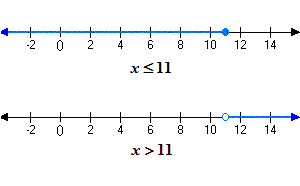
This week in math, we learnt what it would look like when an inequality is graphed, as well as reviewing the meanings of the dots on inequality scales.

We learned how different inequalities appear when graphed using Desmos. For example, when graphing x < 2, we can see that the graph uses a dashed line at x = 2, instead of a solid one. This is because the symbol “<” means that the value at 2 is not included in the solution. Oppositely, when we graph x ≤ 2, a solid line is used to indicate that 2 is part of the solution. This visual difference helps us understand how the two inequalities represent different sets of values.


My biggest mistake this week, was the open and closed dot meanings. The dot being closed, means that the number it lands on IS a possible solution. The open dot, means that the number it lands on, is NOT  solution.

Inequalities

https://www.varsitytutors.com/hotmath/hotmath_help/topics/inequalities

Week 10 – pre-calc 11 – review (graphing)

This week in math was all review for our midterm exam, sprinkled with some practice with table groups.

My biggest finding was that doing corrections on all of my tests has really helped better my understanding of all of the topics and ideas I didn’t understand before. My biggest mistakes were all in the graphing section, which is something I need to do a lot more work on.